Showing posts with label Call & Sms Apps. Show all posts

Tuesday, 23 June 2015

Google Hindi Input 2.3.0.96391319
Google Hindi Input 2.3.0.96391319


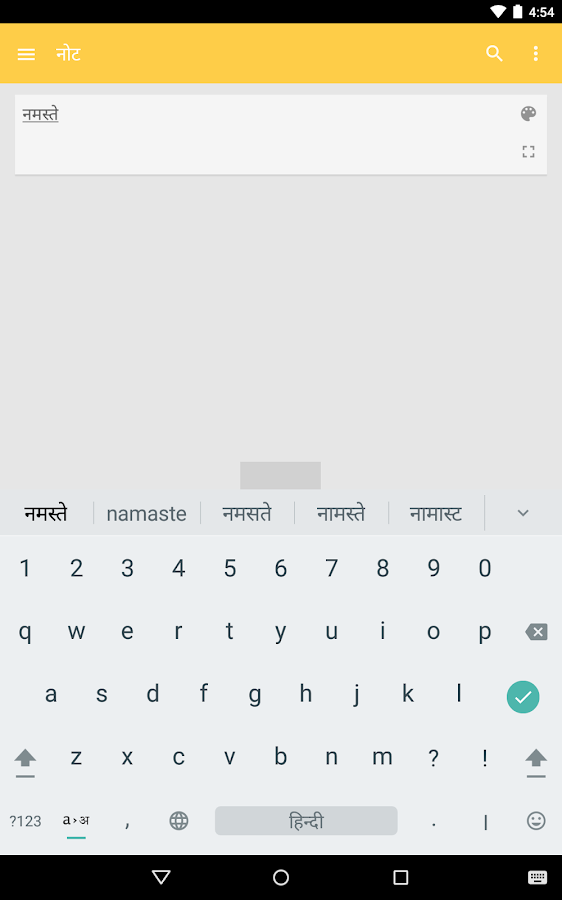
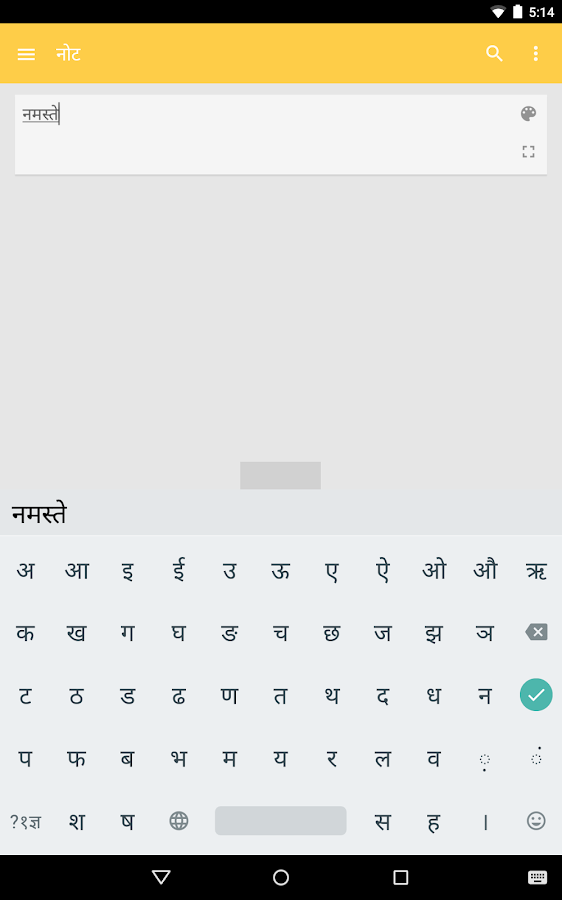
Google Hindi Input is an Indic keyboard which allows you to type messages, update on social networks or compose emails in Hindi on your Android phone. If you can read नमस्ते correctly on your phone, then you may install and use Google Hindi Input, otherwise your phone may not support Devanagari script.
How can I enable it and set it as the default input method/keyboard on my Android phone?
- On Android 5.x and newer versions:
Open Settings -> Language & Input, under “KEYBOARD & INPUT METHODS” section, go to Current Keyboard -> Choose Keyboards -> Check “Google Hindi Input” -> back to “Language & input” -> Current Keyboard -> Select “Hinglish & Hindi Google Hindi Input”
When typing in an input box, you can also change the default input method by clicking the keyboard icon on the bottom right corner of the screen.
- On Android 4.x:
Open Settings -> Language & Input, under “KEYBOARD & INPUT METHODS” section, check Google Hindi Input, then click Default and select “Hindi” in the “Choose input method” dialog.
When typing in an input box, you can also change the default input method by selecting “Choose input method” in the Notification area.
How can I enable/disable Hinglish, Hindi or handwriting keyboard?
Go to Settings->Language & Input->Google Hindi Input->Keyboard, under “Select keyboard type” section, check the keyboard types you like.
How can I change keyboard theme?
Pick the theme you like at Settings->Language & Input->Google Hindi Input->Keyboard->Keyboard theme.
How can I use this application?
Hindi transliteration
- Toggle the button “a->अ” on English keyboard to turn on/off transliteration mode.
- In the transliteration mode, you can type Hindi word in English characters and the app will convert them to Hindi.
- For example, type “hindi” and then you will get the word हिंदी from a list.
English
- By turning off the transliteration mode on English keyboard (by pressing the button “a->अ” again), you can type in English.
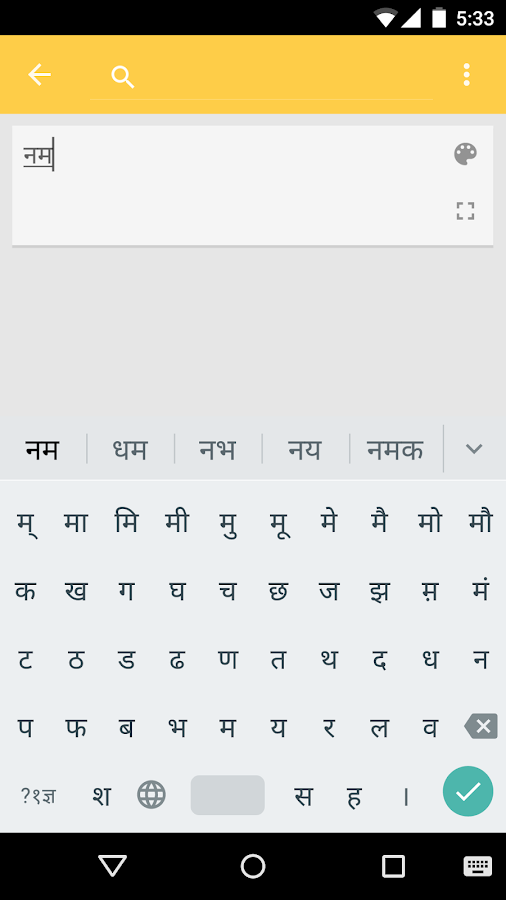
Hindi keyboard
- Toggle the globe button to switch between English and Hindi keyboard
- Vowels are changed to matra automatically after typing consonants.
- Long press characters(vowels and consonants) to type variations of characters. For example, long press “ई” you can type “ई” or “ी”, long press “क” you can type क, कं, क्र or र्क.

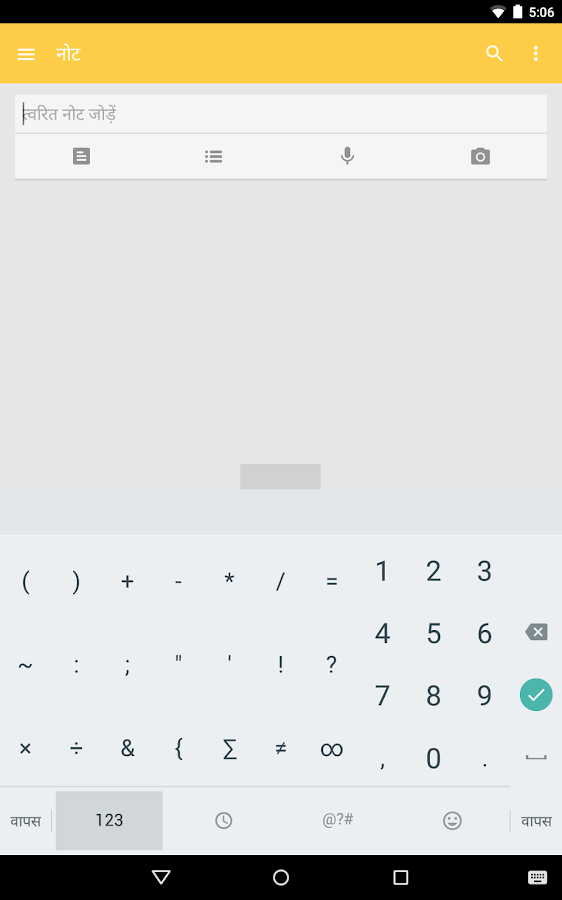
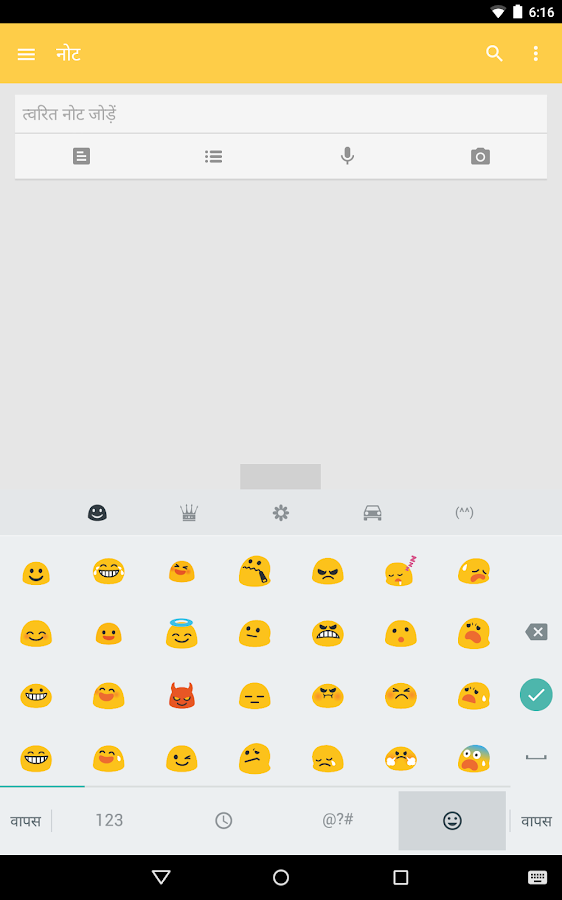
SCREEN SHOTS
Google Hindi Input - screenshotGoogle Hindi Input - screenshotGoogle Hindi Input - screenshotGoogle Hindi Input - screenshotGoogle Hindi Input - screenshot


Tuesday, 16 June 2015

SwiftKey Keyboard 5.3.1.66

SwiftKey Keyboard 5.3.1.66


SwiftKey Keyboard is a free, award-winning keyboard app for Android that learns from you, delivering the best next-word prediction, smarter autocorrect, over 800 emoji (emoticons), bilingual typing and much more! SwiftKey is an alternative touch keyboard that gives you smart, fast typing on Android - free. It's the best smart keyboard for Android for fast SMS, chat, text and email, becoming the default across all your apps. It’s packed full of customization features including over 30 colorful themes, layouts for all screen sizes and devices, and supports over 80 languages.
EMOJI AND EMOJI PREDICTION
Spoil yourself with over 800 emoji characters (emoticons) and clever Emoji Prediction. Our signature prediction tech suggests emoji to match your words - for fun-filled sentences and smiles all round.
TRUSTED BY MILLIONS
The best, top-rated keyboard on Android, now available for free. As CNN wrote, “the number one third-party keyboard ... SwiftKey is a must-have”.
PERSONALIZED PREDICTIONS
Mind-reading word suggestions that learn from you as you type, and get smarter over time.
SMARTER AUTOCORRECT
Intelligent autocorrections for even the sloppiest typing.
BEAUTIFUL THEMES
Customize the look of your keyboard with free and premium themes from the SwiftKey Store.
YOUR KEYBOARD, YOUR WAY
Split. Resize. Undock. Tweak your keyboard with a variety of powerful tools to fit your needs.
Multilingual typing. Choose from over 60 languages and type in up to three at once.
CLOUD-CONNECTED
Sync your writing style securely to the cloud and across devices.
Personalize word predictions from your Gmail, Facebook, Twitter, Evernote and more.
Type with ease about daily news, sports and entertainment topics with Trending Phrases.
Gain access to the SwiftKey Store to browse new themes.
EFFORTLESS TYPING
Swipe your finger across the touch screen to type with SwiftKey Flow or tap predictions for easy, fast typing.
Follow SwiftKey on Facebook https://www.facebook.com/SwiftKey and Twitter https://twitter.com/swiftkey for the latest updates to the best, fastest way to type on a touch screen.
Full list of supported languages
English (US)
English (UK)
English (AU)
English (CA)
Afrikaans
Albanian
Arabic *
Armenian *
Azerbaijani *
Basque
Belarusian
Bosnian
Bulgarian
Catalan
Chinese (Simplified) !
Chinese (Traditional, Taiwan) !
Chinese (Traditional, Hong Kong) !
Croatian
Czech
Danish *
Dutch *
Estonian *
Finnish *
French (CA)
French (FR)
Galician
Georgian *
German *
Greek
Hebrew
Hindi *
Hinglish *
Hungarian *
Icelandic *
Indonesian *
Irish
Italian
Javanese
Khmer
Kazakh
Korean *
Lao
Latvian
Lithuanian
Macedonian
Malay *
Mongolian
Norwegian *
Persian (Farsi) *
Polish
Portuguese (BR)
Portuguese (PT)
Romanian *
Russian
Serbian
Slovak
Slovenian
Spanish (ES)
Spanish (US)
Spanish (LA)
Sundanese
Swedish *
Tagalog
Tatar
Thai !
Turkish *
Ukrainian *
Urdu *
Uzbek
Vietnamese
Welsh
(* = no smart space, ! = no Flow)
SwiftKey Keyboard requests access to your SMS messages in order to improve word predictions based on what you've typed before.
Some features are only supported by certain versions of Android. Emoji is supported on Android 4.1 and above. For more information on emoji support and other FAQs, please see https://support.swiftkey.com/.


Monday, 8 June 2015

GO SMS Pro Premium v6.28 build 270 Cracked

GO SMS Pro Premium v6.28 build 270 Cracked


gsp

GO SMS Pro 6 has been redesigned from start to finish, bringing you a brand new looking and intelligent mobile experience!
GO SMS Pro – Nearly 100 Million users’ choice, all time #1 messaging app to replace the stock!
It’s simple, intuitive, personalizing and fun!
It comes with beautiful themes, lovely stickers, private box, GO chat (send free SMS & MMS) , pop up windows, dual sim support, and much more. We are committed to making GO SMS Pro faster, safer and tons of great features – messaging has never been so fun and efficient!
Free Features
  • Hundreds of personalized themes and lovely stickers (keep increasing)
  • Private box to encrypt messages & protect your privacy
  • GO chat support for free messages and group chat
  • Sticky conversations help you focus on important contacts by sticking them at the top
  • Pop up new messages for quick viewing and replying
  • Dual SIM matching, supports 8,000+ dual SIM devices (keep increasing)
  • SMS blocker smartly block blacklist/keywords and filter spam messages
  • Automatically categorize strangers conversations and keep your Inbox simplicity
Pro Features
  • Support disabling all sponsored messages
  • Advanced Private Box for renaming or hiding entrance, faking notification as well
  • Customize the time of “delay to send”
  • Unlimited cloud storage space for message backup
  • Free to enjoy all the Getjar paid themes (Upgrade to Themes VIP)
Note: All premium features available and no Rooting & Lucky patcher is needed.

Friday, 15 May 2015

EVOLVESMS APK V. 3.2.5


EVOLVESMS APK V. 3.2.5


EvolveSMS apk

EvolveSMS is a powerful texting replacement app that makes talking to your friends quick, fun and easy! It’s been designed from the bottom up with the newest Android guidelines in mind to look beautiful and just plain work. Feel completely immersed in the app with a design that flows freely between, you, all your friends, and Android.
Main features:
- A beautiful and smooth interface for sliding between conversations so everything is just a swipe away
- Full multimedia support including sending pictures, videos, audio, contacts, and GIFs
- A popup that allows you full access to anything in the app and looks great
- Group messaging support
- Full Light Flow support
- 2 different widgets with lockscreen support
- Swipe to delete conversations
- Batch deleting messages
- Archiving messages
- Fully customizable notifications
- Password protection
- Full emoji support (850+ emojis, Android or iOS 7 style)
- Android Wear support
- Desktop messaging through Pushbullet and Yappy
- And much more :)
Unlockable with the customization plugin from inside the app:
- 3 theme options: light, dark and black
- 3 different layouts: Evolve, Hangouts, and Classic
- Facebook and Google+ cover photo integration
- Facebook contact photo integration
- Night mode
- Apply addon themes to fully customize every aspect of look in the app, there are hundreds on the Play Store to enjoy!
Unlockable with the feature plugin from inside the app:
- More MMS options (GIFs and contacts)
- Message backup through Dropbox
- Private inbox
- Scheduled SMS messages
- Personalized mass messages
Here are two different emoji plugins for you to choose from, choose whichever suits you best, install it and never worry about it again!
Android: https://play.google.com/store/apps/details?id=com.klinker.android.emoji_keyboard_trial
iOS: https://play.google.com/store/apps/details?id=com.klinker.android.emoji_keyboard_trial_ios
Please note: The app is completely free to download and enjoy for everyone! There are 2 different in-app purchases to expand on the functionality of the app and help me out with future development… If you like the app, feel free to show it and buy the in-app purchases in the settings menu :)
Permissions explained (there are a lot because of the nature of the app):
- Send SMS: allows for sending messages
- Read SMS: allows for reading messages from the database
- Write SMS: allows for writing messages to the database
- Receive SMS and MMS: allows for notifications to be shown when message is received
- Read Contacts: allows for contact names and pictures to be found and displayed
- Read Phone State: allows for reading your phone number
- Read Profile: allows for reading your contact image
- Vibrate: allows for vibration on notifications and haptic feedback
- Call Phone: allows for calling a contact
- Write External Storage: allows for saving media to the SD card
- Get Tasks: allows for checking if EvolveSMS is currently running or not
- Wake Lock: allows for waking the screen when a new message is received
- Disable Keyguard: allows for unlocking the device after a popup is shown
- Receive Boot Completed: allows services to be started once your device finishes booting up
- Internet: allows for sending MMS messages
- Access/Change WiFi State: allows MMS messages to monitor current WiFi state and disable temporarily if necessary
- Access/Change Network State: allows for enabled network connectivity when sending MMS messages
- Access Location: allows for attaching location to MMS messages
- Get Accounts: allows for signing in and caching Google+ cover photos
- Use Credentials: allows for signing in and caching Google+ cover photos
- Billing: allows for in app purchases

Wednesday, 13 May 2015

SwiftKey Keyboard 5.2.3.143

SwiftKey Keyboard 5.2.3.143


SwiftKey Keyboard is a free, award-winning keyboard app for Android that learns from you, delivering the best next-word prediction, smarter autocorrect, support for over 800 emoji (emoticons), emoji prediction and much more!
SwiftKey is the alternative touch keyboard that gives you smart, fast typing on Android - free. It's the best smart keyboard for Android for fast SMS, chat, text and email, becoming the default across all your apps. It’s packed full of customization features including over 70 colorful themes, layouts for all screen sizes and devices, and supports over 80 languages.
SMARTER AUTOCORRECT
Intelligent autocorrections for even the sloppiest typing.
EMOJI AND EMOJI PREDICTION
Express yourself with over 800 emoji characters (emoticons) and useful Emoji Prediction that learns your favorites. SwiftKey's smart predictive keyboard can also suggest emoji to match your words.
SWIPE TYPING
Swipe your finger across the touch screen to type with SwiftKey Flow or tap predictions to enter whole words in one go for easy, fast typing.
PERSONALIZED PREDICTIONS
Mind-reading word suggestions that learn from you as you type, and get smarter over time.
BEAUTIFUL THEMES
Customize the look of your keyboard with free and premium themes from the SwiftKey Store
BASKETBALL FEVER
Celebrate College Basketball Fever this March and show your team spirit by customizing the keyboard with one of our College Basketball themes.
TRUE BILINGUAL TYPING
Amazing bilingual typing so you can type in two or three languages with speed and ease. Seamlessly type in over 80 languages, and select up to three languages at once for multilingual typing.
SECURE BACKUP AND PERSONALIZATION
Sync your writing style securely to the cloud and across devices.
Personalize word predictions from your Gmail, Facebook, Twitter, Evernote and more.
Type with ease about daily news, sports and entertainment topics with Trending Phrases.
Gain access to the SwiftKey Store to browse new themes.

Follow us on Facebook by searching for "SwiftKey" and on Twitter at @swiftkey.
Supported languages:
Afrikaans
Albanian
Arabic *
Armenian *
Assamese
Azerbaijani *
Basque
Belarusian
Bengali
Bosnian
Bulgarian
Catalan
Chinese (Simplified) !
Chinese (Traditional, Taiwan) !
Chinese (Traditional, Hong Kong) !
Croatian
Czech
Danish *
Dutch *
English (US)
English (UK)
English (AU)
English (CA)
Estonian *
Finnish *
French (CA)
French (FR)
Galician
Georgian *
German *
Greek
Gujarati
Hebrew
Hindi *
Hinglish *
Hungarian *
Icelandic *
Indonesian *
Irish
Italian
Javanese
Kannada
Kazakh
Khmer
Korean *
Kyrgyz
Lao
Latvian
Lithuanian
Macedonian
Malay *
Malayalam
Marathi
Mongolian
Nepali
Norwegian *
Oriya
Persian (Farsi) *
Polish
Portuguese (BR)
Portuguese (PT)
Punjabi
Romanian *
Russian
Serbian
Sinhala
Slovak
Slovenian
Spanish (ES)
Spanish (Latin America)
Spanish (US)
Sundanese
Swedish *
Tagalog
Tajik
Tamil
Tatar
Telugu
Thai !
Turkish *
Turkmen
Ukrainian *
Urdu *
Uzbek
Vietnamese
Welsh
(* = no smart space, ! = no Flow)
Some features are only supported by certain versions of Android. Emoji is supported on Android Jelly Bean and KitKat (4.1 and above). For more information on emoji support, please see https://support.swiftkey.com/.
SwiftKey Keyboard requests access to your SMS messages in order to improve word predictions based on what you've previously typed.
For answers to other commonly asked questions please visit https://support.swiftkey.com/ or do a Google search for 'SwiftKey Support'.


Saturday, 2 May 2015

Full Screen Caller ID – BIG! Cracked Full v3.4.7 APK

Full Screen Caller ID – BIG! Cracked Full v3.4.7 APK


Set a full-screen photo for your friends and enjoy vivid and high definition caller photos.
Connect with Facebook to download friends photos.
Doesn’t work with MIUI ROM – they block third party apps of this type.
Features
  • connect with facebook, and download full-screen photos automatically(and browse albums!),
  • customize caller ID screen content,
  • switch between caller screen Themes, choose click or slider,
  • choose full screen caller ID for all or only a few contacts,
  • full screen caller for incoming calls,
  • full screen caller for outgoing calls.
Themes Editor
  • go to Themes,
  • select and edit,
  • move buttons by holding and dragging,
  • switch to slider with a single click on a button (FIRST you need to drag a button to the edge of the screen)
  • change default contact photo from the MENU button,
  • switch to other states of a call by swiping left or right,
  • reset to default from the MENU button
What’s in this version : (Updated : Apr 26, 2015)
Minor back-end improvements.

Download Link

Mirrors (Size 5.42 MB) 

Tuesday, 28 April 2015

Automatic Call Recorder Pro v4.16 Cracked

Automatic Call Recorder Pro v4.16 Cracked


In this ad free pro version you can automatically save calls from a contact and add comment to a recorded call. You can also stop a recording in progress or start recording when a call is in progress.
Record all desired calls on your phone.
Select which calls to record
You can record all calls or only those that are from numbers that are not in your contacts.
You can play, save and share the recorded calls.
Please note that on some devices recording a call is no possible so please try the free version first.
Auto call recorder also supports wav , ANR, 3gp formats.
Recording on an external sd card or any location desired is also possible.
The audio source is now configurable.
For playing the 3gp format you can use the “MX Video Player”.
If you have a problem with the recording, please try to record with a different audio source,
which you can configure in the settings tab.
Try to record with speaker on or off , until you find the best combination for your phone.
For example you can try Audio Source -> Voice UpLink and speaker off.
What’s in this version: (Updated : Apr 20, 2015)
  • Improved cloud performance
  • UI Improvements
  • Bug fixes
Required Android O/S : 2.1+


Screenshots :


unnamed (1) unnamed (2)
unnamed (3) unnamed (4)


Downloads


APK (4MB)


APK (4MB)